The promise of AI for developers used to be simple. Type a prompt, get some code back, paste it in. That was nice, but it never really changed the way we actually work.
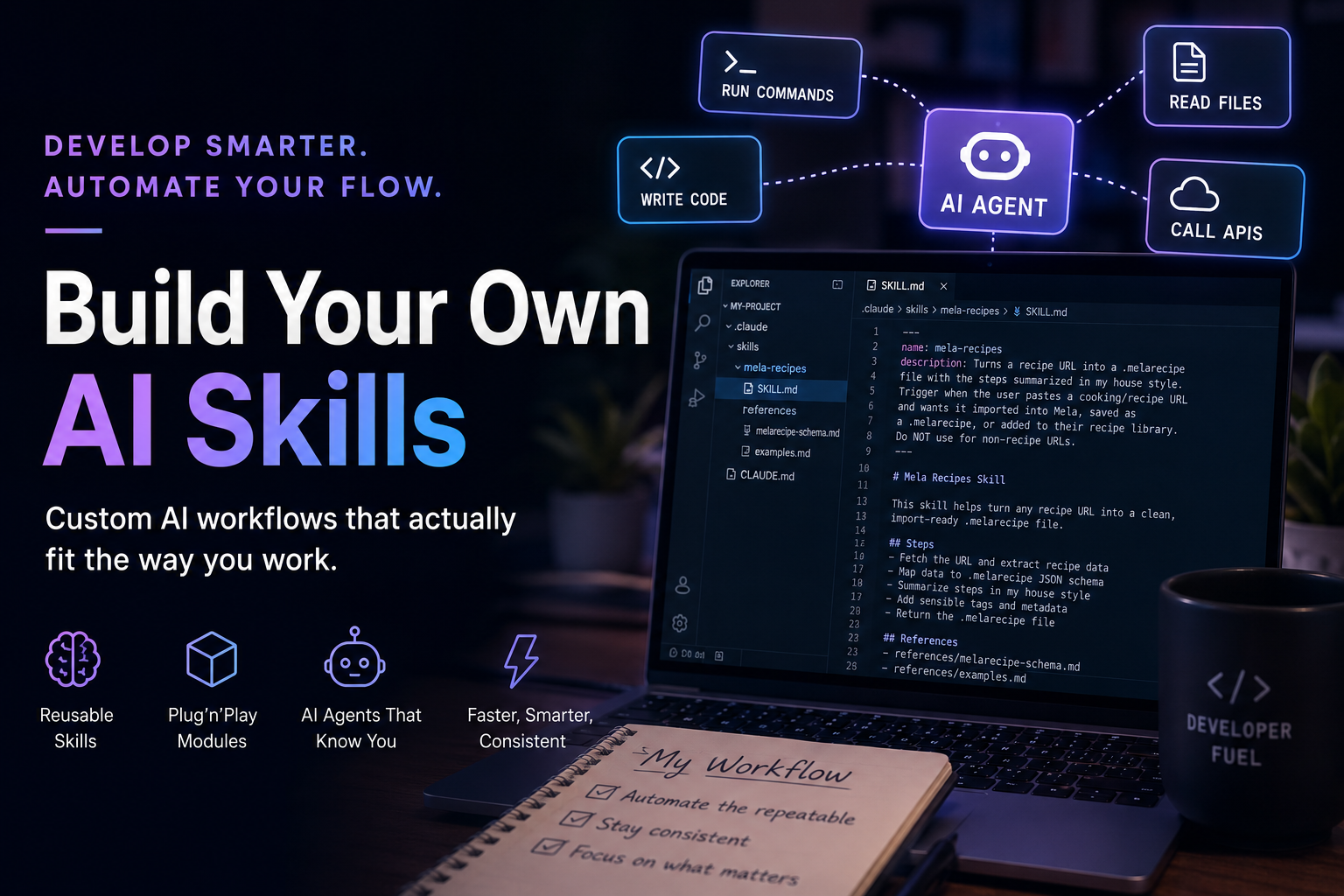
Today the picture looks completely different. AI Agents now sit inside your IDE, your terminal, even your chat tool. They run commands, read files, call your APIs, write code. The question is no longer "can AI help me write code?". The new question is way more interesting: how do I shape my own personal AI workflow that actually fits the way I work?
And that's where Skills come in.
This article shows you how to build your own custom AI Skills, the same way I'm doing it for my daily work as a developer. We'll look at what a Skill actually is, how to write one, and I'll share a few real examples from my own setup.
The Problem
Let's be honest. As developers, we do the same things over and over again.
We write commit messages in the same style. We triage support tickets the same way. We translate snippets, draft release notes, write blog posts in our own voice, generate test cases from defect tickets. Every one of these tasks has a recipe in our head. But every time we do it, we do it manually.
When AI Agents arrived, the first instinct was to just type the recipe into a prompt every single time. That works. Once. After the third time, you start to wonder why you're re-explaining the same thing again.
The other instinct is to dump everything into a single huge system prompt. But that's noisy, slow, and expensive. The Agent has to read 20 pages of context just to do a 30 second task.
There must be a better way, right?
What is a Skill?
A Skill is a small folder of instructions and examples that teaches an AI Agent how to do a specific task in a specific way.
Think of it as a plug'n'play module for your Agent. You drop a Skill into a project, and the Agent picks it up automatically whenever it detects the matching task. No need to remember a special prompt. No need to copy paste guidelines into every chat.
A Skill usually contains:
- A
SKILL.mdfile with the main instructions - Optional reference files like cheatsheets, examples, voice snippets
- Optional scripts or templates the Agent can use
The magic is in the description at the very top of the SKILL.md. The first lines tell the Agent when to trigger this Skill. Write a good description and your Agent will use the Skill at exactly the right moments, without you having to ask.
Our Goal
What I want from my Agent setup is this:
- When I paste a customer support ticket, it should triage it the way my team does
- When I want to create a license for a customer, it should know my license API
- When I share a recipe URL, it should turn it into a Mela file in my house style
- When I draft a blog article, it should match the tone of the rest of my blog
All of this without me having to explain anything every time.
That's exactly what Skills enable. Let me show you how to build one.
Anatomy of a Skill
Let's look at the simplest possible Skill you could build. It's just a folder with two things inside.
my-skill/
├── SKILL.md
└── references/
    └── examples.md
That's it. A folder, a SKILL.md file, and optionally a references/ directory with extra material.
The SKILL.md file always starts with a small frontmatter block:
---
name: my-skill
description: Use this skill when the user wants to do X. Trigger phrases include "do X", "make me an X", "I need an X". Do NOT use for Y or Z.
---

# My Skill

This skill helps with X. Here is how to do it...
The name field is the identifier of your Skill. The description field is the most important part of the whole Skill. The Agent reads the description of every available Skill and decides which one to load based on what you asked.
A good description is:
- Specific about when to trigger. List the actual phrases the user might use.
- Specific about when NOT to trigger. This prevents your Skill from firing on the wrong tasks.
- Action oriented. Start with a verb that describes what the Skill does.
Below the frontmatter is the body of the Skill. This is where you put the actual instructions: the steps to follow, the formatting rules, the voice guidelines, the gotchas to avoid.
A Skill is the moment where you stop thinking of AI as a chat partner and start thinking of it as a teammate that already knows how you work.
Building a Real Skill
Let me walk you through a Skill I actually use every week: I paste a recipe URL, and the Agent turns it into a Mela file I can open straight in my cooking app, with the instructions already summarized in my own style.
It's a nice example because it's not just "voice". This Skill has to do real work: fetch a web page, understand a specific JSON structure, build a valid file, and rewrite text in my house style. That's the whole spectrum of what a Skill can cover.
1. Identify the Recipe
The first step is to figure out what your recipe actually is. For the Mela import, I broke the task down into the concrete steps I do by hand:
- Fetch the URL and pull the actual recipe out of the page, ingredients, steps, title, image.
- Analyze the target JSON structure. Mela imports a
.melarecipefile, which is just JSON with specific fields. The Skill needs to know that shape exactly. - Build the JSON with all the right keys, so the file opens cleanly in the app.
- Summarize the steps in my style. I don't want the original wall of text. I want short, compressed instructions with the key ingredient per step bolded.
- Tag it sensibly, so it lands in the right place in my library.
If you can't articulate your recipe in writing, your Agent definitely can't follow it. So this step is the most important one.
2. Create the Folder Structure
Inside your project (or your global Skills folder), create a new directory.
mkdir -p .claude/skills/mela-recipes/referencesFor project specific Skills, the convention is .claude/skills/<name>/ at the root of your repo. The Agent automatically discovers Skills in that path.
3. Write the SKILL.md
Open SKILL.md and start with the frontmatter.
---
name: mela-recipes
description: Turns a recipe URL into a .melarecipe file with the steps summarized in my house style. Trigger when the user pastes a cooking/recipe URL and wants it imported into Mela, saved as a .melarecipe, or added to their recipe library. Do NOT use for non-recipe URLs.
---
Then add the actual instructions below. Keep them concrete. "Format the recipe nicely" is not concrete. "Fetch the URL, map the fields onto the .melarecipe JSON keys, rewrite each step as a short imperative line with the key ingredient bolded" is concrete.
The Agent will follow exactly what's written. So write for an Agent, not for a human reader who can fill in the blanks.
4. Add Reference Files
For anything that's too long to fit naturally inside SKILL.md, create a references/ folder. I have two reference files for my Mela Skill:
.claude/skills/mela-recipes/
├── SKILL.md
└── references/
    ├── melarecipe-schema.md
    └── examples.md
The melarecipe-schema.md documents the exact .melarecipe JSON structure: every field, which ones are required, and how the steps array is shaped. The examples.md holds a couple of finished recipes in my compressed style, so the Agent has a concrete target to match instead of guessing.
The SKILL.md then references these files at the bottom, so the Agent knows when to load them.
5. Wire it Up With CLAUDE.md
For project specific Skills, I also add a CLAUDE.md at the root of the repo. This is a project level instruction file that gets loaded into every session in this project.
# my-project

When working in this repo, **always read** the following Skill files before importing any recipe:

* [.claude/skills/mela-recipes/SKILL.md](.claude/skills/mela-recipes/SKILL.md)
* [.claude/skills/mela-recipes/references/melarecipe-schema.md](.claude/skills/mela-recipes/references/melarecipe-schema.md)
That guarantees the Agent picks up the Skill in this project, no matter what task you start with. Plug'n'play for your team.
6. Iterate
The first version of your Skill is never the final one. Use it for a week, notice where it drifts from what you actually wanted, then update the Skill.
Every time I catch myself correcting the Agent, I ask one simple question: "is this a one off, or should this go into the Skill?". If the same correction keeps coming up, into the Skill it goes.
That's how a Skill gets sharper over time, without ever growing into a wall of text that nobody reads.
Where Skills Really Shine
Skills are not magic. They don't do anything you couldn't do with a long prompt.
But they give you something a long prompt never can. Consistency.
The Agent uses your Skill the same way every time. In every project. In every chat. You don't have to remember to paste your style guide. You don't have to re-explain your test framework conventions. You don't have to remind it that you don't like marketing voice.
That's the moment AI starts to feel like leverage instead of like another tool you have to manage.
Where to go from here?
Start small. Pick one task you do every week and turn it into a Skill. Don't try to write a perfect Skill on day one. Get a basic version running, use it for a week, then refine it.
Once you have one Skill working, you'll start seeing Skill candidates everywhere. PR descriptions, release notes, customer email drafts, test case generation, code review comments. They're all recipes waiting to be written down.
And then, with a small library of Skills behind you, you suddenly realize that your Agent isn't a chat tool anymore. It's a co worker that already knows how you work.
That's the moment AI gets really interesting for developers.
Conclusion
Building your own Skills is one of the most underrated productivity moves you can make right now. It takes a few hours to write your first one, but it pays off every single day after that.
If you have questions, ideas, or want to share your own Skills, just let me know. I'm always interested in seeing what other people automate in their daily flow.
Links: