I have a company subscription and a private one. Two separate Claude accounts, two different plans, one laptop.
And for way too long my routine looked like this: use the work account all day on client repos, then in the evening switch over to my private account for my own side projects. Every switch meant /logout, /login again, and my context and terminal history gone along with it.
Let's be honest, that's annoying. Right?
The good news: there is a clean, simple way to run both accounts in parallel on the same machine, side by side, without ever logging out. No proxy hacks, no second machine, no browser profiles. Just one environment variable that Claude Code already respects.
The Problem
Out of the box, Claude Code assumes one active login per machine. It stores everything that makes up an account — your auth token, your settings, your history, your project state — in a single config directory.
One directory means one identity. So when you want to switch from your work account to your private account, the only "supported" path most people know is to log out and log back in.
And that's exactly the pain. Switching is not just a click. You lose your session context, your recent conversations live in the wrong place, and you constantly ask yourself which account am I even on right now?
The idea in one sentence
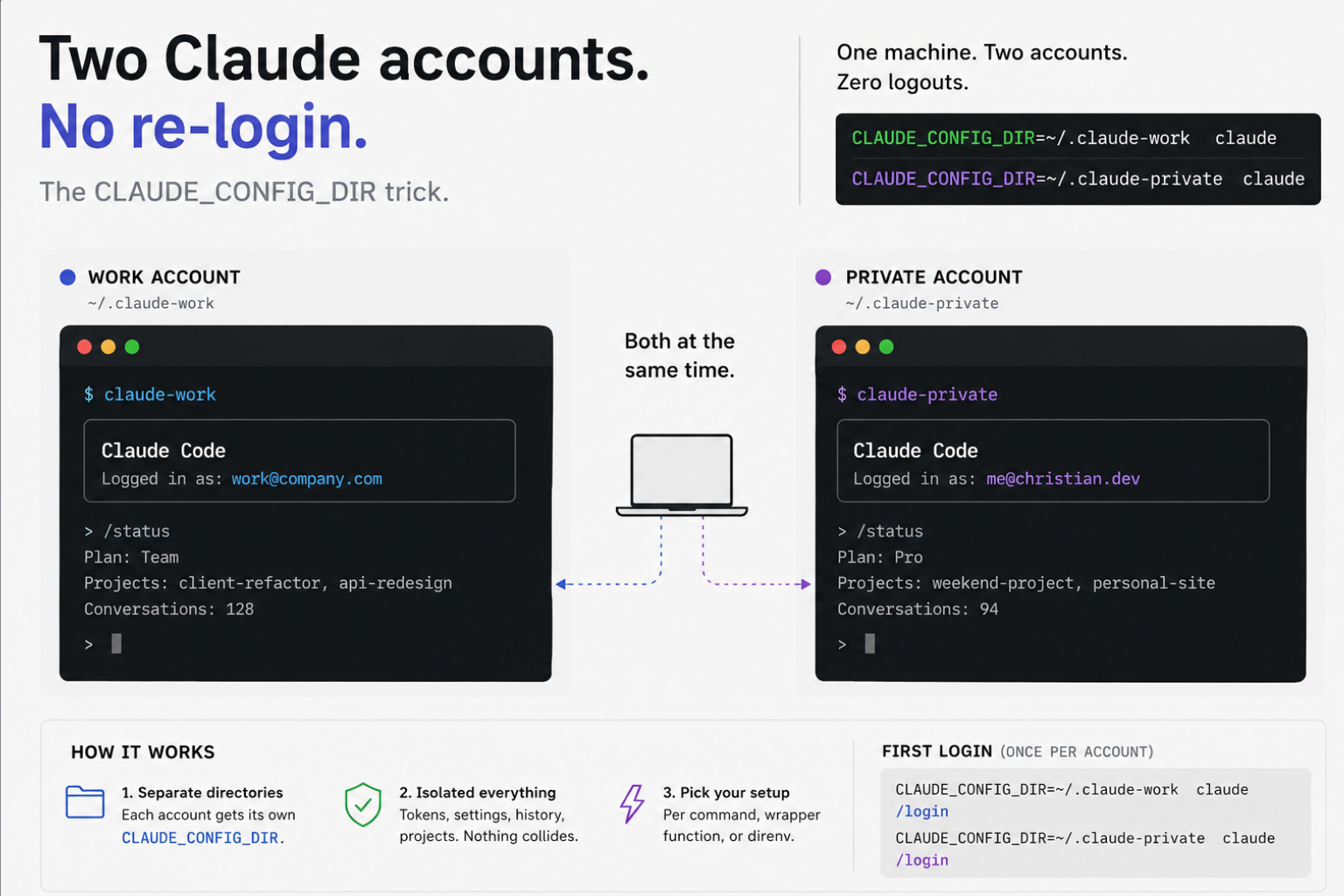
Claude Code reads its config directory from an environment variable called CLAUDE_CONFIG_DIR.
One account = one
CLAUDE_CONFIG_DIR.
Point each account at its own directory and you get two fully isolated Claude installations. Two tokens, two histories, two logins, living happily next to each other. Nothing collides.
That's the whole trick. Everything below is just how to make it comfortable.
The Goal
We want two independent Claude accounts on one machine. Log in once per account, then open a terminal and be instantly on the right identity — no re-login, no guessing. Ideally the setup should be shell-independent, so it works the same in bash, zsh or fish.
Let's set that up.
Setup, two ways
One tip before we start: you don't need a custom directory for both accounts. Keep the account you use most on the plain claude command, so it stays on the default config directory and everything you already have keeps working untouched. Then only your additional account gets its own CLAUDE_CONFIG_DIR. One default, one override — that's the least amount of moving parts.
Pick the one that matches how you like to work. They both rely on the same variable, they just differ in how you set it.
1. Ad hoc, per command
The most explicit way. Prepend the variable directly to the claude call:
CLAUDE_CONFIG_DIR="$HOME/.claude-work" claudeThis starts Claude Code using ~/.claude-work as its config home for exactly this one run. Nothing global changes, nothing leaks into your other account. It's universal and works in every shell, because you're not relying on any shell feature — you're just setting a variable for a single command.
Great for a quick one-off. Less great if you do it forty times a day.
2. Comfortable, a short alias
For daily use you want something short to type. Two small aliases do the job:
alias claude-work='CLAUDE_CONFIG_DIR="$HOME/.claude-work" claude'
alias claude-private='CLAUDE_CONFIG_DIR="$HOME/.claude-private" claude'
Drop these into your ~/.bashrc or ~/.zshrc, open a new terminal, and now claude-work and claude-private each launch Claude with their own isolated account. Since an alias just expands inline, any extra flags still work too, so claude-work --resume does exactly what you'd expect.
If you're on fish, the syntax is a little different, but the idea is identical:
alias claude-work='CLAUDE_CONFIG_DIR="$HOME/.claude-work" claude'
alias claude-private='CLAUDE_CONFIG_DIR="$HOME/.claude-private" claude'
Two aliases, two accounts, one keystroke each. Easy peasy.
And here's the variant I actually run: instead of stuffing everything into the alias, point it at a small shell script on disk. Create a file, say /.../scripts/claude-priv.sh (put it wherever you keep your scripts):
#!/usr/bin/env zsh
CLAUDE_CONFIG_DIR="$HOME/.claude-priv" claude "$@"
Make it executable with chmod +x /.../scripts/claude-priv.sh, then alias to it:
alias claude-priv='/.../scripts/claude-priv.sh --dangerously-skip-permissions'The good thing is: the account logic now lives in a real file you can version, share across machines, or extend later — add default flags, environment tweaks, whatever. Notice that the script keeps "$@" clean and forwards everything straight to Claude, so I put the extra flags in the alias instead of hardcoding them into the file. That way the script stays reusable and each alias decides its own behavior. One small note on --dangerously-skip-permissions: I add it here on purpose because this is my own isolated private setup, but it does exactly what it says, so only add it if you know what that means for your machine (of course generally not something to hand out lightly ;).
First login per account
Each config directory is a blank slate, so each one needs its own login exactly once.
CLAUDE_CONFIG_DIR="$HOME/.claude-work" claudeInside, run /login and authenticate with your work account. Then do the same for the private directory:
CLAUDE_CONFIG_DIR="$HOME/.claude-private" claudeRun /login again, this time with your private account. That's the only manual step, and you only do it once per directory. After that the tokens live in their own homes and refresh independently.
Both at the same time
Now the fun part. Open two terminals side by side.
Left one:
claude-workRight one:
claude-privateTwo Claude Code sessions, two different accounts, running at the same time, completely isolated. No logout, no switching, no context loss. One account can be grinding through a client refactor while the other reviews your weekend project.
And that's it. That's the whole setup.
Stumbling blocks you might hit
A few things worth knowing before you call it done:
- A separate config dir is a fresh install. This is the tradeoff you should be aware of: a non-standard
CLAUDE_CONFIG_DIRis a clean, empty home. Your skills, settings, and MCP servers don't magically carry over — they live in whichever directory they were installed in, and a second account means installing them again in its own folder. Both configs exist side by side, fully independent. It's the reason for the tip up top: leave your main account on the default directory so you only maintain the extras in one extra place. - macOS Keychain vs. file token. On macOS, Claude Code may store credentials in the Keychain rather than as a plain file inside the config directory. In practice
CLAUDE_CONFIG_DIRstill keeps the two accounts separated, but if you ever see one login bleeding into the other, that's the first place to check. Verify your own machine once — behavior here is the detail most worth confirming for your setup. - Windows global state. On Windows some global state lives in
~/.claude.json, which sits outside the per-account directory and can collide. If you're on Windows, keep an eye on that file when two accounts start stepping on each other. - Directory permissions. Each config directory holds your auth token. Keep it to your user only, don't hand it a world-readable
777(that's of course generally not recommended ;) and don't sync it into a shared cloud folder.
Conclusion
One environment variable, one directory per account, one alias each. Log in once, then never log out again. Both accounts live side by side, and the only thing that ever switches is which terminal you're typing in.
It took me way too long to stop logging in and out every time I moved between work and my private projects. Don't be me — set it up once and forget about it.
If you have questions, ideas or feedback, just let me know.
Links: